We Proposed Index Management in Business Central. Microsoft Delivered It in BC29.
Back in December 2022, we raised an idea on Microsoft's Dynamics 365 Ideas portal: give Business Central developers a supported way to disable and enable existing indexes and SIFT, including those defined in the base application and in other extensions. With Business Central 2026 release wave 2 (BC29), that capability has arrived. It is great to see it actioned almost four years later. Better late than never, and we warmly welcome it.
In this post, we look back at what we proposed, what Microsoft has now delivered, and why it matters so much for the real-world performance of a live Business Central system, based on what we see on live Business Central and Dynamics NAV systems every week.
1. What We Proposed in 2022
On 13 December 2022, on the Dynamics 365 Ideas portal, we posted Ability to Disable, Enable Index and SIFT in Base and Other Apps Using Table Extension. The problem was simple: developers could add new keys in their own extensions, but they had no way to switch off unused keys and SIFT inherited from the base application or other apps, even when business processes meant those keys were never used.
We suggested extending table extensions so keys could be modified, with syntax like this:
tableextension 50001 "Cust Ledger Ext" extends "Cust. Ledger Entry"
{
    keys
    {
        key(Tune6; "Document No.", "Posting Date")
        {
            SumIndexFields = "Sales (LCY)";
            IncludedFields = "Adjusted Currency Factor";
        }
        modify(Key18)
        {
            MaintainSiftIndex = false;
            MaintainSqlIndex = false;
            Enabled = false;
        }
        modify(Key17)
        {
            MaintainSiftIndex = true;
            MaintainSqlIndex = true;
            Enabled = true;
        }
    }
}
The goal was to give developers and performance tuning professionals the tools to remove unused indexes and SIFT, reduce database size, and speed up the application by adding the indexes and SIFT that are actually missing.
2. What Microsoft Has Delivered
Microsoft has delivered this in stages over the last two releases:
- BC28 (2026 release wave 1): administrators can turn individual indexes off and on from the Table Information page, per company or for all companies.
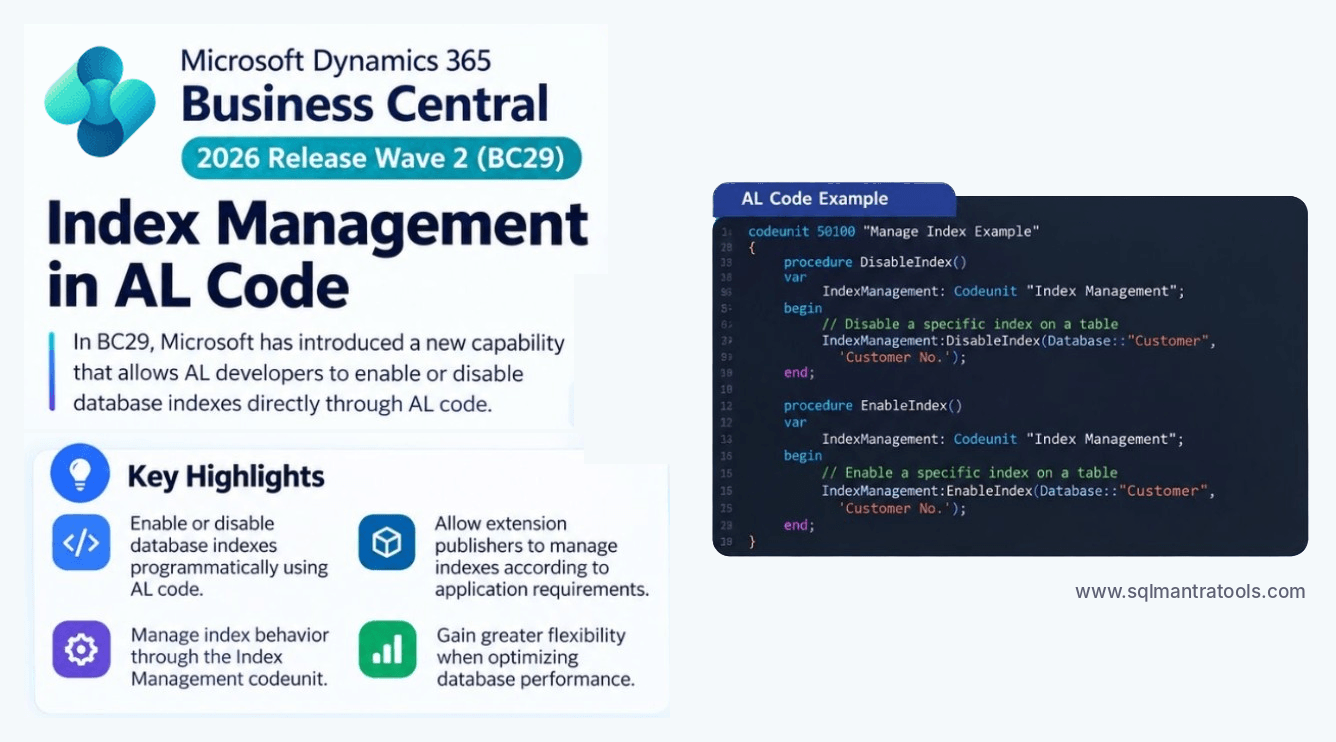
- BC29 (2026 release wave 2): AL developers can turn indexes on and off from AL code, through the Index Management codeunit. App publishers can now ship index management that matches their own features.
- BC29: administrators can turn SIFT indexes on and off, the other half of our original request.
- BC29: developers can define indexes that span fields from a base table and its table extensions, closing another long-standing gap for extension-heavy systems.
Microsoft's implementation differs from our proposed syntax. It uses an Index Management codeunit and administration pages rather than modify() on keys in a table extension, but the outcome is exactly what we asked for: control over the indexes and SIFT in your system, including those defined by Microsoft and other publishers.
3. Why This Matters: Our Field Experience
Based on our 25+ years of field experience analysing Business Central and Dynamics NAV systems, 15% to 25% of indexes and SIFT on a typical live system are never used in practice. They were added for features the customer does not use, for reports the customer never runs, or by extensions whose functionality has since changed.
Unused indexes are not harmless. Every one of them is maintained on every insert, modify and delete, so they:
- slow down posting and other write-heavy processes
- hold locks for longer, increasing blocking and deadlocks between users
- increase database size, backup time and index maintenance windows
- consume database capacity, which on Business Central SaaS means real storage costs
Removing them, and adding the indexes and SIFT that are genuinely missing, is one of the most effective performance improvements available. Until BC28, it was not possible to do this in a supported way for tables that are not part of your own extension.
4. Before You Turn Anything Off
This is a powerful capability, and it needs to be used with care. Before switching off an index or SIFT:
- measure actual usage over a full business cycle, including month-end and year-end processing
- check which extensions, reports and integrations rely on the key, including filters and sorting
- repeat these checks for every company in the database, as an index may be used in one company and not in another; an index or SIFT turned off for all companies is removed from every company
- understand the trade-off: faster writes, but potentially slower reads for any query that used the index
- test in a sandbox with realistic data volumes and concurrent users before changing production
- review your decisions after every major update, as base application changes can alter how keys are used
5. How SQL Mantra Tools Helps
Knowing which indexes and SIFT to turn off is the hard part, and you need to get it right or risk new performance issues in your live system. Our Business Central performance health check and index tuning service, together with Performance Insights for Business Central, identify unused and missing indexes and SIFT on your live system, show which users, AL code and extensions are affected, and give you a prioritised, evidence-based list of changes. BC29 now gives you a supported way to apply them, de-risking the process.
If your Business Central or Dynamics NAV system is slowing down as it grows, avoid guesswork: contact us at sales@sqlmantratools.com or through our contact us page. As Business Central and Dynamics NAV performance specialists, we can help you better than anyone else.
References
- Our original idea on the Dynamics 365 Ideas portal (December 2022)
- What's new in Business Central 2026 release wave 2 (update 29.0) – Microsoft Learn
- Roadmap 573314: AL developers can turn indexes on/off in AL code
- Roadmap 573316: Administrators can turn SIFT indexes on/off
- Roadmap 573315: Indexes spanning base table and table extension fields
- Business Central indexes overview – Microsoft Learn
Related reading:Business Central 29 Table Extensions: From Companion Tables to Zero Joins and We Asked for It in 2020: How Business Central Performance Monitoring Caught Up
Frequently asked questions
Can I turn off indexes in Business Central?
Yes. From BC28, administrators can turn indexes off and on from the Table Information page. From BC29, AL developers can do the same from AL code, and administrators can also turn SIFT indexes on and off.
Who proposed enabling and disabling indexes and SIFT in Business Central?
SQL Mantra Tools proposed it on Microsoft's Dynamics 365 Ideas portal in December 2022, suggesting a way to disable and enable indexes and SIFT in the base application and other extensions.
How many indexes in Business Central are unused?
In our field experience, 15% to 25% of indexes and SIFT on a typical live Business Central or Dynamics NAV system are never used in practice.
Is it safe to disable indexes in Business Central?
It is safe when the decision is based on measured usage over a full business cycle and tested before going live. Disabling an index that is still needed can make some queries much slower and can cause new performance issues. This is a typical optimisation challenge, so we advise getting expert help before turning off any index or SIFT.