Business Central 29 Table Extensions: From Companion Tables to Zero Joins
When we saw the first release of AL and the extension model back in 2018, and the way table extensions were implemented in SQL Server as separate tables, alarm bells rang. As performance tuning specialists for Business Central and Dynamics NAV, we raised our concerns with Microsoft through the official partner feedback and support channels at the time, highlighting the performance impact we expected to see as customers added more extensions and their databases grew.
Eight years later, Microsoft has addressed it. As the saying goes, better late than never, and we welcome this very important architectural change. In Business Central 29, table extension fields are finally stored in the base table itself. Let's take a closer look at how we got here, and what each step has meant for performance.
1. A Quick History: How NAV Did It
In the classic Dynamics NAV days, adding fields to a table meant opening it in the Object Designer and adding them. On SQL Server there was simply one table: add five fields to the Customer table and the Customer table got five more columns. It was fast and simple, but it was also one of the reasons NAV solutions became so hard to upgrade, because customisations were woven directly into Microsoft's objects.
When Microsoft introduced the AL extension model, it decided extension fields had to live somewhere separate, so that apps could be installed, upgraded and removed without touching the base objects. That decision was right for the development model. The way it was physically implemented in SQL Server is where the performance story begins.
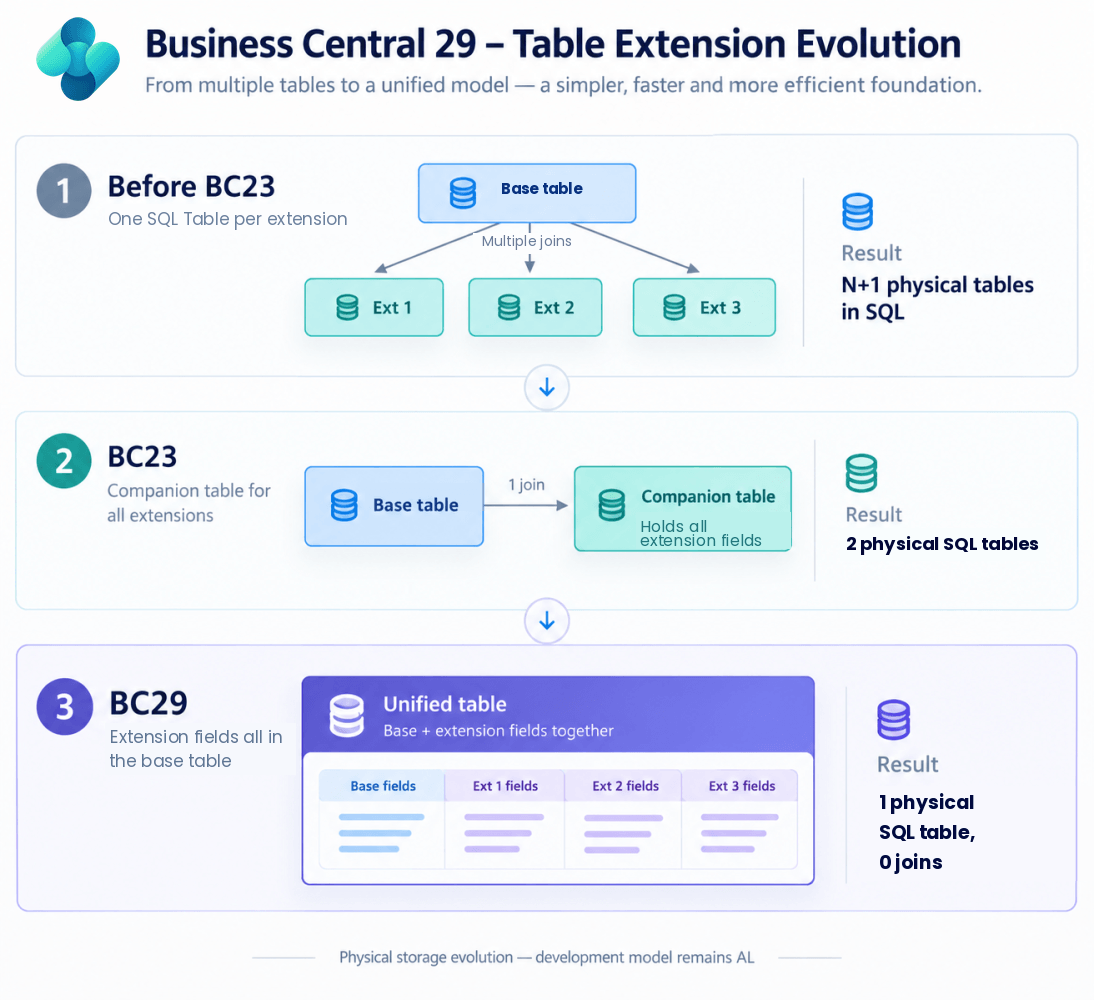
2. Stage 1 (up to BC22): One Companion Table per Extension
From the first Business Central releases, every app that extended a table got its own companion table in SQL Server. Extend the Customer table from three apps and you had four physical tables: the base table plus one per app, each holding the new fields plus a copy of the parent table's primary key, and each with exactly one row for every customer record. On a heavily customised system this leads to an explosion in the number of SQL tables and a steadily growing database.
To present the full record, the platform had to join the base table to every one of those companion tables. On busy, heavily extended tables such as Sales Header (36), Sales Line (37), Item Ledger Entry or G/L Entry, it was common to see five, six, seven or more apps involved, including Microsoft's own apps. That meant joins across eight or more tables for what the user saw as a single record.
The hidden cost on every write
Reads were only half the problem, and the half that gets talked about. Every write was multiplied too. Because each companion table holds a matching row for every base record, inserting one Sales Line with seven extending apps meant up to eight INSERT statements, all inside the same transaction. The same applied to MODIFY and DELETE. Every one of those statements takes locks, writes to the transaction log and maintains its own indexes, so posting routines that create thousands of ledger entries paid that price thousands of times over, and held locks for longer while doing it. Longer-held locks on more tables mean more blocking and a bigger surface for deadlocks.
Microsoft's first mitigation: SetLoadFields
Microsoft's answer to the read side was partial records (SetLoadFields), which let developers specify only the fields they need. If code didn't touch any field from a particular app, that app's companion table could be left out of the join. It helped where developers used it well, but in practice many code paths and most pages need the full record, and predicting which fields can safely be excluded is hard. It also did nothing for the cost of writes.
3. Stage 2 (BC23): One Consolidated Companion Table
With Business Central 23 (2023 release wave 2), Microsoft addressed this design flaw and consolidated the separate companion tables. All extension fields from all apps extending a given table were moved into a single companion table. However many apps extend Sales Line, there are now only two physical tables, so a full read is at most one join, and every insert, modify or delete is at most two statements instead of N+1.
For heavily extended customers, this was a significant and very visible improvement.
Real-world benchmark: before and after BC23
At SQL Mantra Tools we benchmarked the effect of this consolidation on a live customer site that upgraded from BC21 to BC25, using our Performance Insights for Business Central product. The daily pattern of slow queries stayed the same, which is what you would expect since the business was doing the same work, but the scale of that pattern dropped considerably. The time-series analysis shows it clearly.
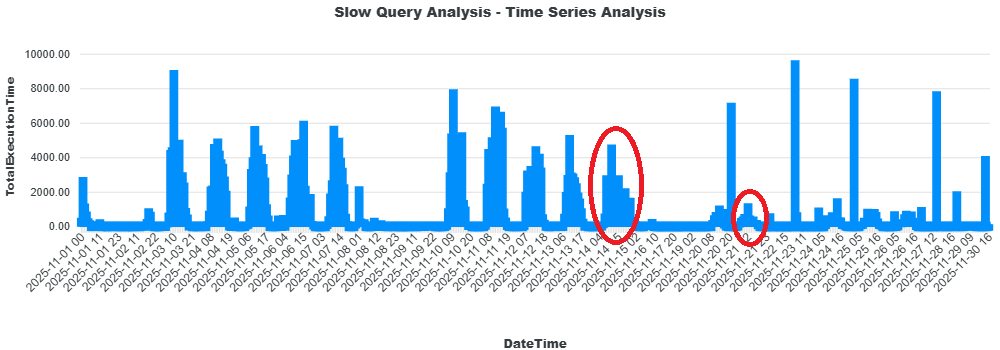
Working from the Performance Insights data, the system became 5.4 times faster. That is a typical figure for this change; the exact gain varies from site to site depending mainly on how many extensions are involved. The full results and charts are in point #13 of our article Top tips to improve Business Central performance.
What BC23 still didn't solve
Two problems remained. There was still one join and a second write for every record. And, crucially for performance design, keys still could not combine base-table fields with extension fields, because they lived in different physical tables.
This matters more than it sounds. A typical example: your app adds fields to Cust. Ledger Entry and you filter on Customer No. together with your own field. You cannot add Customer No. to a key in your table extension, because it isn't your field. Many partners worked around this by adding a duplicate "Customer No." field to their extension and keeping it in sync in code, purely to get an index that performs. That is more code, more data and more chances for the two copies to drift apart.
4. Stage 3 (BC29): Extension Fields Live in the Base Table
In Business Central 29, extension fields are physically stored as columns of the base table. The development model doesn't change: you still write table extensions in AL, apps remain separately installable, and nothing changes in how you deploy. What changes is the storage underneath, and the benefits are substantial.
No joins on read
One table means no join at all, whether the code loads one field or all of them. Queries are simpler, execution plans are more predictable, and SQL Server reads fewer pages to return the same data.
One statement per insert, modify and delete
This is the benefit that gets the least attention, and in our experience it is one of the biggest. Every write is now a single SQL statement against a single table. Compared with BC23 that removes a whole extra INSERT, UPDATE or DELETE for every record touched; compared with the original design it removes up to N of them. Fewer statements mean shorter transactions, fewer locks, less transaction log activity and less index maintenance, which translates directly into faster posting, faster batch jobs and less blocking between users.
Significant storage savings
The companion table had exactly the same number of rows as its parent. Each of those rows carried its own copy of the primary key, its own row overhead and its own clustered index. On a small table that is trivial. On the very large tables many of our customers run, such as G/L Entry, Value Entry, Item Ledger Entry or Sales Line with tens or hundreds of millions of rows, that duplication adds up to many gigabytes of data and index space that served no business purpose.
Removing it shrinks the database, reduces backup and restore times, lowers storage costs, and means more of the useful data fits in SQL Server's memory (buffer pool), which itself improves performance. For Business Central SaaS customers, it also helps with database capacity limits.
Keys and SIFT indexes that combine base and extension fields
With everything in one table, you can now define keys and SIFT indexes in a table extension that mix standard fields with your own. For example, in Cust. Ledger Entry, you can simply create a key on Customer No. plus your own field. The duplicate-field workaround is no longer needed, and indexes can finally be designed around how the data is actually filtered. In the demonstration we reviewed, this requires the new AL runtime that ships with platform 29.
5. A Word of Caution: The Designer Still Creates Clutter
One thing BC29 does not fix is extension sprawl. Every time someone uses the in-client Designer to add fields or change a page, it creates a separate extension. Over time that leaves a customer with a clutter of small extensions, which become hard to manage and lead to code-management and dependency problems. Each extension also adds to the number of columns on the tables it touches, bringing the SQL Server limits mentioned below closer.
Our advice is clear: consolidate customer-specific changes into a single "Customisation" extension, adding fields properly using VS Code rather than the in-client Designer.
6. At a Glance
| BC14 – BC22 | BC23 – BC28 | BC29 onwards | |
|---|---|---|---|
| Physical tables in SQL | Base table + one per extending app (N+1) | Base table + one companion table (2) | One table |
| Joins to read a full record | Up to N | 1 | 0 |
| SQL statements per insert / modify / delete | Up to N+1 | 2 | 1 |
| Duplicate rows stored | One extra row per record, per extending app | One extra row per record | None |
| Keys and SIFT mixing base and extension fields | Not possible | Not possible | Supported |
7. Things to Be Aware Of
No architecture change is free, though for most customers these points are more theoretical than practical.
- Uninstalling an app and deleting its data used to mean dropping its companion table. Now its columns must be dropped from the shared base table, so on very large tables, plan this for a maintenance window.
- Capacity. Because all extension fields now share the base table's row, every app on that table draws from one budget. That budget is about 1,000 fields and just under 8,000 bytes per record, once Business Central's system fields and SQL Server's row overhead are taken out of SQL Server's 1,024-column and 8,060-byte limits. Before BC29, extensions had their own budget in the companion table. If a limit is ever reached, it will be the record size rather than the field count, but standard tables leave several thousand bytes free, and officially, Microsoft's supported maximum of 500 fields per table is the sensible design ceiling anyway. In our view, a table needing hundreds of extra fields is a design issue worth revisiting regardless.
Conclusion
This is one of the most important architectural changes since Business Central moved to AL, and it took a great deal of engineering to make it happen this late in the product's life. Credit to Microsoft for doing it. For customers with large databases and heavily extended tables, BC29 brings faster reads, noticeably cheaper writes, smaller databases and the freedom to design proper indexes across base and extension fields.
See What BC29 Means for Your Own System
If you want to see what this change means for your own system, or to find out where your Business Central performance is really being lost, SQL Mantra Tools can show you the exact Business Central users, AL code and SQL queries behind every slowdown, blocking and deadlock incident.
Find out more about Performance Insights for Business Central (P014) or get in touch to discuss a performance health check.