We Asked for It in 2020: How Business Central Performance Monitoring Caught Up
In June 2020, in the early days of Business Central, we raised three ideas with Microsoft. We asked for a way to see who was involved in every deadlock, every blocking incident and every slow query, and which code they were running, for both SaaS and on-premises systems.
At the time, finding the cause of a slow, blocked or deadlocked Business Central system was close to impossible without that information. Six years on, much of what we asked for has been delivered, and the same thinking runs through every tool we build. This post sets out the timeline, because it shows something we are proud of: we have been working on Business Central and Dynamics NAV performance, alongside Microsoft, for a very long time.
1. The Timeline
| When | What we raised with Microsoft | What Microsoft delivered |
|---|---|---|
| 25+ years | Performance tuning Navision, then Dynamics NAV, on SQL Server, including some of the largest retail systems in Europe. | Our experience shaped the tools we built: named users, the code behind every slow query, blocking and deadlocks. |
| June 2020 | Three ideas for Business Central: the deadlock victim's code and user name, a blocking notification and user names in slow query reporting, all available centrally and in telemetry, for SaaS and on-premises. | Microsoft replied that it was investing in Application Insights telemetry as the preferred way forward. |
| April 2022 | Our June 2020 ideas on deadlocks and user names. | Business Central 20: deadlocks reported with the code involved, and every user given a telemetry ID, so slow queries, blocking and deadlocks can be traced to a user. |
| December 2022 | Disable and enable indexes and SIFT in the base application and other extensions. | Business Central 28 and 29 (2026): indexes and SIFT turned off and on, including from AL code. |
| Today | A full blocking chain: who is blocking whom, with the code on both sides. | Still open with Microsoft. Performance Insights for Business Central already gives you this. |
2. What We Asked for in June 2020
Back then, Business Central could tell you that something was slow, blocked or deadlocked. It could not reliably tell you who it happened to or which code caused it, and in a busy system with many users that is exactly what you need to know. So we asked Microsoft for three things:
- Deadlocks: show the user name and code of both sides, including the user who lost (the "victim"), not just the session that survived. View the idea.
- Blocking: a notification showing who is blocking whom, the code each user was running and the table they were waiting on. View the idea.
- Slow queries: add the Business Central user name to slow query reporting. View the idea.
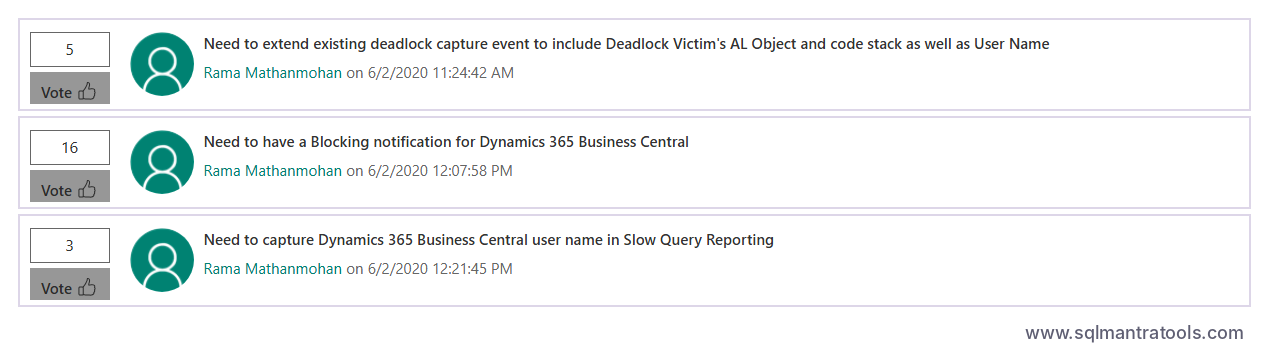
In each case we asked for the information to be available in one central place and as telemetry, for both Business Central SaaS and on-premises. A live system often runs several service tiers on different servers, so looking at each one separately simply does not work in practice. For example, in a busy multi-user live system, a Business Central user connected to one service tier can block another user connected to a different service tier, something we have been tuning to improve performance for years. The same applies to deadlocks.
3. What Microsoft Has Delivered Since
Microsoft's reply to our slow query idea explained that it was investing in Application Insights telemetry as the preferred way forward. That is exactly the direction Business Central took:
- April 2022 (Business Central 20): deadlocks are reported with the code involved, and every user has a telemetry ID, so slow queries, blocking and deadlocks can finally be traced back to a user.
- 2026 (Business Central 28 and 29): indexes and SIFT can be turned off and on, the second idea of ours to be delivered. Read the full story in We Proposed Index Management in Business Central. Microsoft Delivered It in BC29.
Today, this telemetry is the backbone of Business Central performance monitoring. It is great to see these ideas become part of the product. Better late than never.
4. The Gap That Is Still Open
Our blocking idea is still open with Microsoft. Business Central still does not give you, out of the box, a clear picture of who is blocking whom, with the code on both sides. In addition, Microsoft's telemetry does not give you the Business Central user name, only a telemetry ID for each user. That needs interpreting, and it makes it much harder to report, group and analyse the issues faced by a group of Business Central users.
We did not wait: we have bridged the gap. Performance Insights for Business Central monitors every user, around the clock, and shows the named Business Central user, the AL code and the SQL behind every slow query, blocking incident and deadlock, on both SaaS and on-premises. It reports, analyses and groups performance issues by Business Central user, or by a group of Business Central users such as a store, its POS tills, a department or an integration, which is very useful in practice. Its built-in Ask AI for Fix then suggests the AL code fix or solution for each issue. See it in action in our video walkthrough. For Dynamics NAV, the Performance Tool for Dynamics NAV has done the same for years, showing which NAV user is blocking which, with the code on both sides.
5. Why This Matters to You
Performance problems are rarely solved by guesswork. They are solved by knowing exactly who was affected, when it happened and which code caused it. We have been asking for that information, building tools around it and using it to fix live systems for more than 25 years, long before it was standard in Business Central.
If your Business Central or Dynamics NAV system is slowing down, contact us. As Business Central and Dynamics NAV performance specialists, we can help you better than anyone else.
Further Reading from Our Blog
- We Proposed Index Management in Business Central. Microsoft Delivered It in BC29.
- Business Central 29 Table Extensions: From Companion Tables to Zero Joins
- Who's Blocking Whom? How to See the Real Dynamics NAV Users Behind Blocking, Deadlocks and Slow Queries
- How to Use AI to Diagnose and Fix Business Central Performance Issues
- Why Most BC & NAV Performance Health Checks Miss the Real Cause
- Top Tips to Improve Business Central Performance
- Enable Tri-State Locking to Improve Business Central Concurrency
- Using SIFT to Speed Up Counts in Business Central
- Partial Key Filtering Issue in Business Central
- SQL Server Scheduler for SQL Express
References
- Our idea: deadlock victim's code and user name (June 2020)
- Our idea: blocking notification for Business Central (June 2020)
- Our idea: user name in slow query reporting (June 2020)
- Our idea: disable and enable indexes and SIFT (December 2022)
- Business Central 2022 release wave 1: deadlocks logged to telemetry – Microsoft Learn
- Business Central 2022 release wave 1: user IDs in telemetry – Microsoft Learn
Frequently asked questions
Who asked Microsoft to show user names and code for Business Central deadlocks, blocking and slow queries?
SQL Mantra Tools raised these ideas on Microsoft's Dynamics 365 Ideas portal in June 2020, asking for the user name and code of both sides of every deadlock and blocking incident, and user names in slow query reporting, for SaaS and on-premises.
Can Business Central show which user caused a deadlock?
Since Business Central 20 (April 2022), deadlocks are reported with the code involved, and each user has a telemetry ID that links the event to a user. Performance Insights for Business Central shows the named user, AL code and SQL behind every deadlock.
Can Business Central show who is blocking whom?
Not fully out of the box. Our June 2020 idea for a complete blocking notification is still open with Microsoft. Performance Insights for Business Central shows the named users, AL code and SQL behind every blocking incident today.
How long has SQL Mantra Tools worked on Business Central and Dynamics NAV performance?
For more than 25 years, from Navision and Dynamics NAV on SQL Server through to Business Central SaaS and on-premises.