Who's Blocking Whom? How to See the Real Dynamics NAV Users Behind Blocking, Deadlocks and Slow Queries
It is 10:15 on a Monday morning. The business is working hard to catch up on the orders that came in over its peak-trading weekend. All of a sudden, the warehouse cannot post shipments, sales order entry has frozen and the phones are ringing. The DBA opens SQL Server Activity Monitor and finds heavy blocking and many slow-running queries. The culprit? The Dynamics NAV service tier. And who is it blocking? The Dynamics NAV service tier.
If you support Microsoft Dynamics NAV, you have probably seen exactly this. The SQL Server tools are telling the truth, but it is not an answer anyone can act on. You need to know which NAV user is blocking which, and which C/AL code is holding the lock, so that you can fix the problem permanently and stop it from happening again. This article explains why standard SQL Server tools cannot tell you, and how the Performance Tool for Dynamics NAV does.
Why SQL Server Sees One User Instead of Hundreds
The reason lies in how Dynamics NAV talks to SQL Server, which changed fundamentally with Dynamics NAV 2013.
Navision and Dynamics NAV 2009 and earlier: users connected directly
In Navision and Dynamics NAV up to and including NAV 2009, each user session connects to SQL Server under the user's own SQL login. A DBA could look at a blocking chain and at least see which login, and therefore which user, was involved, even though the C/AL code behind it stayed invisible. The Performance Tool for Dynamics NAV names the Dynamics NAV users in every block and deadlock on these versions, as well as on NAV 2013 and later.
Dynamics NAV 2013 onwards: the service tier runs SQL on behalf of NAV users
From Dynamics NAV 2013, every client connects to the Dynamics NAV Server (the service tier), and only the service tier connects to SQL Server, using its own service account. Microsoft also redesigned data access so that the service tier pools its SQL connections. In Microsoft's own words, “there is no longer a one-to-one correlation between the number of client connections and the number of SQL Server connections.”
This brought real benefits: far less memory per user, a shared data cache and better scalability. But it also means that, to SQL Server, every NAV user looks identical. As bbrown, a long-standing contributor on the Mibuso forum, put it in the accepted answer to a question about matching NAV sessions to SQL Server: “The only ‘user’ that SQL Profiler knows about is the service login account used by the NST. It knows nothing of the individual NAV users connected to the NST.”
The consequences for troubleshooting are significant:
- sp_who2, Activity Monitor, Extended Events and most third-party SQL monitoring tools report the service account, so a blocking chain reads as “service tier blocking service tier”.
- A SQL session (SPID) is not a NAV user. Because of connection pooling, one NAV session's work can run on different SQL connections over time, so you cannot reliably match a SPID to a person. Forum threads asking how to link a NAV session to a SQL SPID go back years without a dependable answer.
- The SQL statement alone rarely tells you which C/AL code generated it. The same SELECT on Item Ledger Entry can come from many processes, such as warehouse posting or purchase order posting, as well as from a report, a FlowField or a customisation.
What About NAV's Own SQL Tracing?
Dynamics NAV 2013 introduced SQL tracing, which can add the C/AL call stack to SQL statements so that it appears in SQL Server Profiler. It is a useful developer tool, but it was never designed for production troubleshooting:
- It has to be switched on deliberately, per session or for all sessions, before the problem happens.
- Making sense of the output means capturing it and reliably matching it against various logs by hand, let alone managing the volume of data efficiently.
- It does not, by itself, give you a 24/7 history of who blocked whom, with the blocking and blocked code side by side.
When a deadlock happens at 10:15 on a Monday, you need the evidence to have been recorded already, because the problem is hard to reproduce.
How the Performance Tool for Dynamics NAV Puts the Users Back
SQL Mantra Tools has been tuning Navision, Dynamics NAV and Business Central systems for more than 25 years. The NAV 2013 architecture change was exactly the kind of problem our customers brought to us, so we built the solution into our tools.
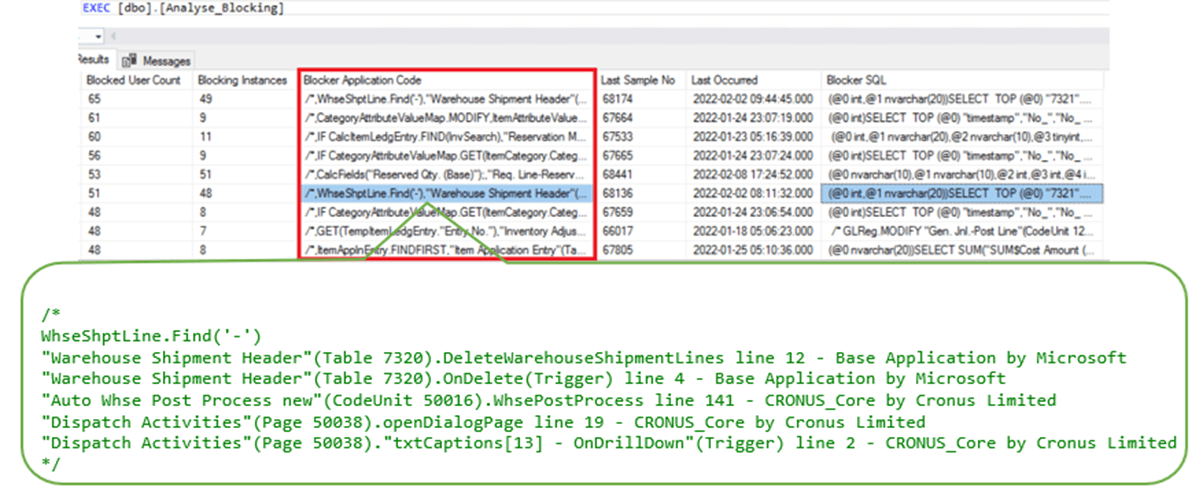
The Performance Tool for Dynamics NAV runs 24/7 as a passive black box. It combines SQL Server-side capture with lightweight NAV helper objects, so that each performance incident is matched to the Dynamics NAV user and the C/AL code involved. The result is that blocking is reported as “NAV user X is blocking NAV user Y”, with the code on both sides.
For blocking, the analysis shows:
- the leading blocking Dynamics NAV user, the one at the head of the chain
- the leading blocked users, the people who were waiting
- the leading blocking C/AL code, and the blocked C/AL code that was waiting on it
- the blocked resource, meaning the table, index or key, for every session
- the full blocking log, with timings

For deadlocks, it shows the deadlocking and deadlocked NAV users, the deadlock C/AL code pair (the two pieces of code that collided) and the resources each side held.
For slow-running processes, it identifies the slow C/AL code and the SQL behind it, and can filter the analysis to a single NAV user.
It also includes a live view of current blocking, showing who is blocking whom and who is leading the chain, which is exactly what you need while the phones are still ringing.
The table below compares standard SQL Server tools with the Performance Tool for Dynamics NAV.
| Question | Standard SQL Server tools (NAV 2013 onwards) | Performance Tool for Dynamics NAV |
|---|---|---|
| Who is blocking? | The NAV service tier's service account | The named Dynamics NAV user, e.g. DESPATCH-07 |
| Who is being blocked? | The same service account | The named Dynamics NAV users waiting, e.g. SALES-02, SALES-05 |
| Which code holds the lock? | A SQL statement only | The blocking C/AL code, plus its SQL statement |
| Which code is waiting? | A SQL statement only | The blocked C/AL code, plus its SQL statement |
| Who was in the deadlock? | Two service-tier sessions | The deadlocking and deadlocked NAV users and their C/AL code pair |
| Which resource? | Table, index or key | Table, index or key, for every session |
Instead of “the service tier blocked the service tier for 47 seconds”, IT managers and DBAs can derive something like this from our blocking analysis:
“DESPATCH-07, running warehouse shipment posting (Codeunit 5763 Whse.-Post Shipment), held a lock on Item Ledger Entry that blocked SALES-02 and SALES-05 in sales order release for 47 seconds.”
It pinpoints the root cause of the performance problem quickly and accurately, so that the developer can fix it and stop the same incident from happening again.
Which Dynamics NAV Versions Are Covered?
- Blocked and blocking SQL is reported for every version, including Navision.
- Named Dynamics NAV users are captured for every version: through the SQL login in Navision and Dynamics NAV 2009 and earlier, and through the Performance Tool's own capture from Dynamics NAV 2013 onwards.
- The C/AL code (blocking, blocked and deadlocked) is captured from Dynamics NAV 2013 onwards. Setup involves loading the small helper objects and switching on SQL tracing centrally, as described in the user manual.
- We support and tune every version of Navision and Dynamics NAV, whether or not Microsoft still supports your version.
Dynamics NAV has no built-in performance profiler. Microsoft introduced one only in Business Central 19, so for NAV systems the Performance Tool fills that gap.
Beyond Blocking: A Complete NAV Performance Toolkit
The same tool also keeps your NAV database healthy. It proactively optimises tables and indexes, including automatic detection of unused indexes, and checks SQL Server setup, memory, CPU, disk response, database and NAV application settings against best-practice guidelines. Many of our Dynamics NAV customers started using it specifically to find out who was blocking whom, and which C/AL code was involved, so that they could improve the performance of their Dynamics NAV system.
Find Out Who Is Really Blocking Your Dynamics NAV System
If your SQL Server tools keep telling you the service tier is blocking itself, we can show you the real Dynamics NAV users and C/AL code behind it. We have been finding the real cause of Navision and Dynamics NAV performance problems for more than 25 years.
Find out more about the Performance Tool for Dynamics NAV (P003) or talk to us about your NAV system.
Frequently asked questions
Why does SQL Server show the Dynamics NAV service tier blocking itself?
From Dynamics NAV 2013, all users connect to SQL Server through the NAV service tier's service account, and the service tier pools its SQL connections. SQL Server therefore sees one login for everyone, so a block between two NAV users appears as the service tier blocking itself.
Can I match a Dynamics NAV session to a SQL Server SPID?
Not reliably. Because of connection pooling, there is no one-to-one relationship between NAV sessions and SQL Server sessions. The Performance Tool for Dynamics NAV records the NAV user and C/AL code with each incident, so you do not need to make that match yourself.
Does the Performance Tool for Dynamics NAV show the blocked code as well as the blocking code?
Yes. It records the C/AL code of both the blocking and the blocked user, and for deadlocks the C/AL code pair of both sessions, along with the SQL statements and the resources involved.
Does it work on old Navision versions?
Yes. Blocked and blocking SQL and the named NAV users are reported for every version, including Navision (through the SQL login in Dynamics NAV 2009 and earlier). C/AL code capture is available from Dynamics NAV 2013 onwards. We support and tune every version of Navision and Dynamics NAV, whether or not Microsoft still supports it.