How to use SIFT to speed up Counts in Dynamics NAV & Business Central
We all know Dynamics NAV and Business Central are using SIFT to aggregate data to calculate sums across a large set of records, summing millions of rows in a fraction of a second to give balances like inventory in a blink of a second. In many cases you can get totals out from such SIFT structures from Business Central and Dynamics NAV faster than sums from an OLAP cube. These SIFTs can make or break the performance of Dynamics NAV or Business Central system and hence it is the secret of the success of it all the way from Navision to Dynamics NAV to Business Central.
A less well-known application of these SIFTs, is to perform count operation as well. Using SIFT to speed up counting the rows could significantly speed up the response and loading time of tiles in Business Central menus. To understand this, let’s see how SIFT is implemented in SQL first.
When developers define SIFT is the AL or C/AL development language, it leads to the creation of Index view. A SQL view with its columns indexed. Further in the Index view, fields defined in the “key” property will be GROUP BY and fields defined in the “SumIndexFields” property will be summed. This leads to an interesting SQL requirement, which is “If GROUP BY is present, the VIEW definition must contain COUNT_BIG(*) and must not contain HAVING”. Visit on the Microsoft website for more details. To fulfil this requirement, each Index view has a hidden field (not visible through AL and C/AL development environment) called "$Cnt", counting the number of records for each combination of the field values in the key. See an example below, a SIFT (index view) for Key18 of Customer Ledger Entry Table.
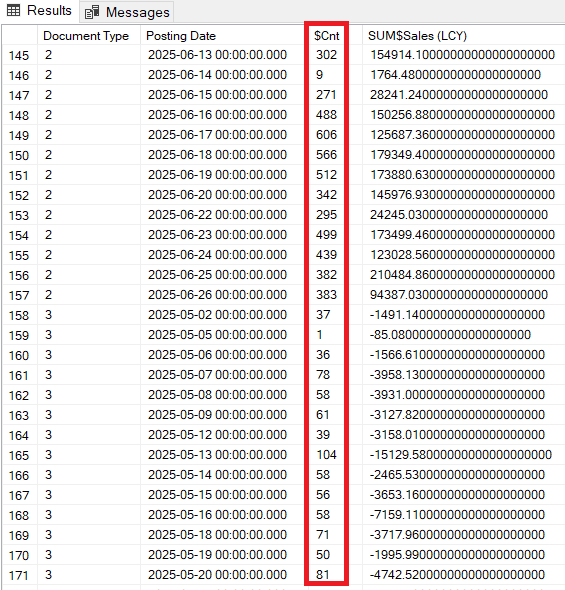
Suppose the requirement is to count the customer ledger entries for specific posting dates or a range of posting dates the above SIFT could be used for faster calculations. The cool thing about it is that you do not need to specify which SIFT to use for the count, like with the Sums, it will find and use the best SIFT if there is one. Suppose there is no SIFT to support your counting, you can create a new one in your extension, you just need to specify a decimal field in “SumIndexFields” property in your key. You can pickup any field. Systems do not care about it.
Hope you have read about a very useful byproduct, when you create a SIFT, that can be utilised to speed up the COUNT operations in Dynamics NAV & Business Central which works for both SaaS and On-Prem platforms.