Why Most BC & NAV Performance Health Checks Miss the Real Cause
Most Dynamics NAV and Business Central performance health checks leave you with a report full of observations and no clear path to fixing the problem. The reason is not the experience of the provider — it is the tools they use. Most diagnostic tools used in the market cannot see the AL code, the named user or the network impact behind a performance incident. Without that information, root cause analysis is guesswork. This article explains what a genuinely useful Dynamics NAV and Business Central performance health check looks like, what most providers miss, and why the difference matters when peak trading is approaching.
1. What Most Health Checks Miss and Why It Matters
If you have previously commissioned a Dynamics NAV or Business Central performance health check from another provider, the chances are the report left you with more questions than answers. Here is why.
Most performance analysis tools used in the market — including many well-known third-party monitoring solutions — cannot expose the C/AL code or AL code contributing to a performance incident. They can tell you that a slow query occurred, but they cannot tell you which line of AL code triggered it, which codeunit or object was responsible, or which Business Central extension the code belongs to. The result is a report full of SQL-level observations with no clear path back to the application layer where the fix actually needs to happen.
SQL Mantra Tools is different. Our Performance Logging module, combined with our AL code integration, captures the exact C/AL and AL code stack involved in every blocking event, deadlock and slow query — recorded 24/7 as a black box for your ERP system. Our System Analysis module then surfaces this in an easy-to-understand interface, so you can see precisely which application code is behind each performance incident.
The same gap exists when it comes to named users. Most health check providers cannot attribute a performance incident to a specific Business Central or Dynamics NAV user, because their tools do not capture that level of detail. SQL Mantra Tools captures the actual BC/NAV user name involved in every blocking, deadlock and slow query incident. This transforms the analysis, for example, instead of knowing that blocking occurred at 14:32, you know which user triggered it, what they were doing, what AL or C/AL code and SQL code was executing at the time, along with the list of BC/NAV users affected and the AL or C/AL and SQL code they were running, which gives a clear and complete picture of the performance incident.
There is a third area that most health check reports ignore entirely: network impact. Competitor tools cannot attribute a Business Central user to a network-related performance incident or pattern. SQL Mantra Tools can, because our Performance Insights for Business Central product captures telemetry at the user level and correlates it with execution patterns — giving a complete picture that includes network behaviour as a contributing factor.
The consequence of these gaps is that most health check reports are vague about the root cause. Our health check report produces a prioritised, evidence-based action plan, without guesswork, with pinpoint accuracy down to the AL or C/AL code, the SQL query, the named user and the extension responsible.
2. Causes of Performance Problems Are Never Just One Thing
The most common mistake organisations make when facing a slow Dynamics NAV or Business Central system is to look for a single cause. In reality, an ERP system is made up of many interconnected layers and performance issues can exist in one or several of them simultaneously.
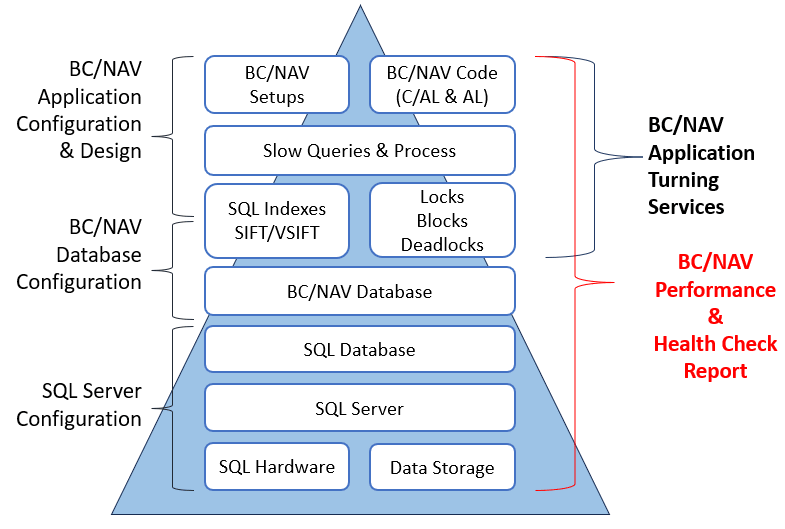
At SQL Mantra Tools, we take a structured top-down approach, examining every layer of your BC or NAV environment:
- BC/NAV Application Configuration & Design — BC/NAV setups, C/AL and AL code, locks, blocks and deadlocks,slow queries and processes
- BC/NAV Database Configuration — SQL indexes, SIFT/VSIFT the BC/NAV database itself
- SQL Server Configuration — the SQL database engine, SQL Server setup, hardware, data storage and its configuration
Unless every layer is examined and any weakness addressed, you will not effectively resolve the underlying performance issue. Patching one layer while ignoring another simply moves the problem rather than solving it.
3. The Four Phases of a Proper Performance Health Check
The first step toward better Dynamics NAV or Business Central performance is a comprehensive health check, without it, you are guessing at the cause. But a health check report on its own changes nothing. The real improvement happens in the performance tuning task that follows, which we run as a disciplined cycle of Monitor, Analyse, Plan and Implement. <\p>
This is the step some organisations skip. They commission a health check, receive the report, and then never act on its findings — whether through lack of internal resource, competing priorities, or simply not knowing where to start. The result is predictable: the same performance problems such as blocking, deadlocks, slow queries repeat, because the root cause identified in the report was never actually addressed. A health check tells you what is wrong and why. Performance tuning is the work of fixing it.
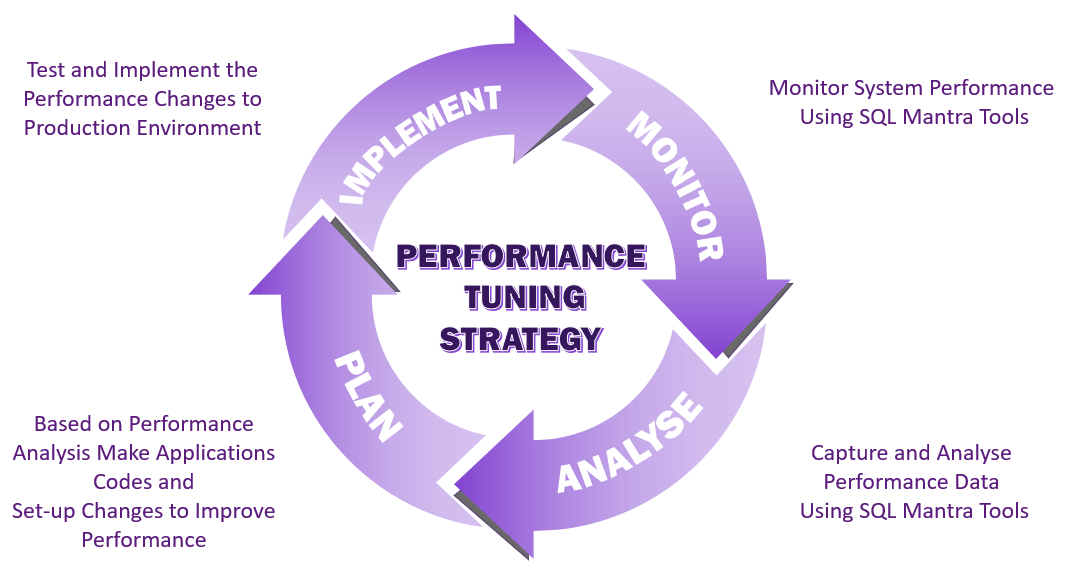
Monitor — using SQL Mantra Tools to capture performance data 24/7, recording slow queries, blocking events, deadlocks, CPU utilisation, network latency, disk response index usage etc... across your entire BC or NAV environment.
Analyse interpreting that performance data correctly, identifying patterns by user, by AL or C/AL code, by SQL query, by extension and by time of day. Raw performance data on its own says very little — two people interpreting the raw performance data can reach completely different conclusions. What separates a useful analysis from a misleading one is consistency and depth of performance tuning experience. This is where SQL Mantra Tools differs from most providers: 25+ years of interpreting this exact type of data means we recognise the same patterns reliably, every time, rather than treating each incident as a fresh puzzle with no prior reference point.
Plan — based on the analysis, producing a prioritised, practical action plan that targets the root cause rather than the symptoms.
Implement — applying the changes to your production environment in a controlled way, then returning to the Monitor phase to validate the improvement.
Depending on the complexity of your environment, this cycle may need to run more than once. The key is having the right tools and the right expertise at each stage.
4. What Our Performance Health Check Covers
A SQL Mantra Tools BC/NAV Performance Health Check examines all of the following:
SQL Server & Hardware Layer
- SQL Server configuration validated against industry best practice
- Memory configuration analysis — the single most important hardware factor affecting performance
- CPU utilisation analysis — historic and live
- Disk latency analysis — for a busy BC/NAV OLTP database, latency must be under 20ms; above 50ms indicates a serious I/O bottleneck
- Database file layout analysis
- SQL Server wait analysis — giving a bird's-eye view of what SQL Server is waiting on
Database Layer
- BC/NAV database configuration analysis
- Index fragmentation analysis with adaptive fill factor review
- Table size and database growth analysis
- SIFT and VSIFT usage review
- Unused index identification — removing unused indexes in a typical BC/NAV database can reduce database size by 15–25%
- Change log and Session Event table health
Application Layer
- Blocking analysis — historic and live, identifying the leading blocking users, the blocked resources, and the AL or C/AL code chain behind each event
- Deadlock analysis — deadlock query pairs, AL or C/AL code pairs, deadlocked and deadlocking users and resources
- Slow query analysis — by user, by AL code, by SQL code, by extension, by object, by time of day
- Dynamics NAV/BC setup analysis — key performance-related configuration validated against best practice
- Scheduler job and job queue analysis
5. Performance Insights: the New Standard for BC SaaS Health Checks
For Business Central SaaS and On-prem environments, SQL Mantra Tools offers Performance Insights — a product that sets a completely new standard for what a health check can deliver.
Performance Insights connects directly to your Business Central telemetry and presents analysis such as slow query, deadlock, lock timeout, network latency through interactive dashboards accessible from any device. The analysis can be broken down by extension, named BC user, location, AL code, SQL code, object, date and hour — giving an unprecedented level of visibility into exactly where your SaaS environment is struggling and why.
The fuzzy user filtering feature is particularly powerful for multi-site or POS environments. By filtering on a user pattern such as "S012" you can isolate all performance incidents experienced by a specific store, or by filtering on "P0" you can see all POS-related slow queries and the exact AL code behind them — something no competitor tool can produce.
6. The Unique Depth of Our Health Check Reporting
Because SQL Mantra Tools captures performance data at every layer — SQL Server, database, application code and named user — our health check report delivers something that most providers simply cannot: a prioritised, evidence-based action plan that traces every performance incident back to its precise source.
Rather than recommendations like "consider reviewing your indexes" or "SQL blocking was observed during peak hours," our report tells you exactly which AL or C/AL code line and the extension that is causing the performance problems, as well as giving a solution to prevent the issue from recurring.
This level of clarity means your development team, your Microsoft partner and your internal IT team all receive clear, actionable guidance — not a document that raises concerns without answering them.
7. Common Symptoms That Signal You Need a Health Check
Consider requesting a Dynamics NAV or Business Central performance health check if your users are regularly experiencing any of the following:
- Frozen screens or the "Working on it…" spinner appearing frequently during normal operations
- Blocking error messages such as "We can't save your changes right now, because a record in table 'xxxxxxxxxx' is being updated in a transaction done by another session"
- Deadlock errors such as "The activity was deadlocked with another user who was modifying the xxxxxxxxxx table. Please retry the activity"
- Slow report generation, particularly for reports processing large volumes of data
- Performance that degrades noticeably during peak trading hours
- Performance that has worsened following a Business Central upgrade, an extension update, or a significant increase in data volume
- Users on specific sites or using specific functionality experiencing slowness that others do not
If any of these sound familiar, the underlying cause is almost certainly traceable — you simply need the right tools to find it.
8. On-Premises, SaaS or Hybrid — We Cover All Environments
SQL Mantra Tools supports performance health checks across all BC and Dynamics NAV versions running on SaaS and on-premises.
For on-premises including IaaS and SaaS environments our three products from our toolset.
Performance Insights for Business Central Gives unprecedented insights into Business Central 365 SaaS and On-prem environments, detailing performance issues such as blocking, deadlocks, slow running processes and network latency, giving crucial information such as SQL Code, AL Code, the extension involved, and the named Business Central user and their location behind every incident — via our web portal with interactive graphs and tables, making it one of the easiest and most user-friendly collaborative tools for Microsoft Business Central.
Performance Tool for Dynamics NAV Gives unprecedented insights into Dynamics NAV On-prem environment detailing performance bottlenecks such as blocking, deadlocks and slow running processes, giving crucial information such as C/AL Code, SQL Code and the Dynamics NAV Users involved and many more. It will also maintain ERP system free from performance issues proactively optimising the tables, index and its structure. The analysis module will check and report SQL Server Setups, Memory, CPU, Disk response & setup, SQL Database Setups, Application Setups and many more against best practice guidelines for better performance.
Scheduler for SQL Server Express Edition — provides scheduler functionality for SQL Express edition, which is very useful for LS POS enviornments to schedule automated maintenance jobs.
9. Who Benefits Most
A SQL Mantra Tools performance health check is particularly valuable for:
- IT Managers and System Administrators responsible for BC or NAV stability who need clear evidence of what is causing issues and what to do about it.
- Microsoft Dynamics Partners supporting customers with chronic performance problems which are very challenging to fix.
- Finance and Operations Directors whose teams are losing productivity to a slow ERP system during critical trading periods.
- Development teams working on AL extensions who need to understand the performance impact of their code in production environment in reality.
10. Do Your MOT Regularly
A Dynamics NAV or Business Central system is not static. It changes continuously — through Microsoft platform updates, partner extension releases, customisation changes, data volume growth and shifts in user behaviour. Each of these changes moves the performance dial, sometimes in ways that are not immediately obvious until peak demand arrives.
Just as you would not take a vehicle into its busiest working period without an MOT, you should not take your ERP system into peak trading periods such as Black Friday, Christmas, end of financial year without a performance health check. The last thing any organisation needs is a sales and revenue loss because the ERP system could not cope with demand at the critical moment.
SQL Mantra Tools offers an annual System Health Check service designed precisely for this purpose — giving you confidence that your BC or NAV system is in good shape before peak load arrives, with any weaknesses identified and addressed in advance rather than discovered under pressure.
Ready for a Performance Health Check?
Whether your Dynamics NAV system has been running for fifteen years or your Business Central SaaS environment went live last quarter, a SQL Mantra Tools performance health check will give you a clear, evidence-based picture of how your system is performing and exactly what needs to change to make it perform better.
With 25+ years of specialist BC and NAV performance tuning experience, tools that see deeper than anything else on the market, and a track record with Microsoft partners worldwide including Archerpoint, Insight Works and idyn — we are uniquely placed to deliver a health check that gives you a practical action plan, not just a list of observations.
Request your Business Central or Dynamics NAV Performance Health Check today
Frequently asked questions
Why do most Business Central and Dynamics NAV performance health checks fail to identify the root cause?
Many performance analysis tools don't expose the C/AL or AL code, the named user, or the network impact behind a performance incident. They confirm that a slow query, blocking event or deadlock occurred, but don't trace it back to the specific line of code, codeunit, extension and user responsible. Without that detail, root cause analysis becomes guesswork and the resulting report is full of observations with no clear path to a fix. SQL Mantra Tools' Performance Logging and System Analysis modules capture the exact AL or C/AL code stack, the named BC/NAV user, and network behaviour behind every incident, producing a prioritised, evidence-based action plan instead.
Why do Business Central and Dynamics NAV performance problems rarely have just one cause?
A Business Central or Dynamics NAV environment is made up of several interconnected layers — application configuration and AL/C/AL code, database configuration including SQL indexes and SIFT/VSIFT, and the underlying SQL Server configuration and hardware — and performance issues can exist in one or several of these layers simultaneously. Fixing one layer while ignoring another simply moves the problem rather than resolving it. SQL Mantra Tools takes a structured top-down approach, examining every layer of the BC/NAV environment so that no contributing weakness is missed.
What is the difference between a performance health check and performance tuning?
A performance health check tells you what is wrong and why — it is the diagnostic step, without which any attempt at improvement is guesswork. Performance tuning is the work of actually fixing the issues the health check identifies, run as a disciplined cycle of Monitor, Analyse, Plan and Implement. Some organisations commission a health check, receive the report, and never act on its findings due to lack of internal resource or competing priorities — and the same performance problems then repeat because the root cause was never addressed. A health check on its own changes nothing; the improvement happens in the tuning cycle that follows.
What does the Monitor, Analyse, Plan, Implement performance tuning cycle involve?
Monitor means using SQL Mantra Tools to capture performance data 24/7 — slow queries, blocking events, deadlocks, CPU utilisation, network latency and disk response across the entire BC or NAV environment. Analyse means interpreting that data correctly to identify patterns by user, AL or C/AL code, SQL query, extension and time of day, which requires consistency and depth of experience rather than treating each incident as a fresh puzzle. Plan means producing a prioritised, practical action plan that targets the root cause rather than the symptoms. Implement means applying the changes to production in a controlled way, then returning to Monitor to validate the improvement. Depending on environment complexity, this cycle may need to run more than once.
What does a SQL Mantra Tools Business Central or Dynamics NAV performance health check cover?
A SQL Mantra Tools performance health check examines three layers. The SQL Server and hardware layer covers SQL Server configuration against best practice, memory configuration, CPU utilisation, disk latency (which must be under 20ms for a busy BC/NAV OLTP database, with above 50ms indicating a serious I/O bottleneck), database file layout and SQL Server wait analysis. The database layer covers BC/NAV database configuration, index fragmentation with adaptive fill factor review, table size and growth, SIFT and VSIFT usage, unused index identification (removing unused indexes can reduce database size by 15-25%), and Change Log and Session Event table health. The application layer covers blocking and deadlock analysis with the AL or C/AL code chain behind each event, slow query analysis by user, code, extension and time of day, Dynamics NAV/BC setup analysis, and scheduler job and job queue analysis.
What makes Performance Insights for Business Central SaaS different from other health check tools?
Performance Insights connects directly to Business Central telemetry and presents analysis of slow queries, deadlocks, lock timeouts and network latency through interactive dashboards accessible from any device. Analysis can be broken down by extension, named BC user, location, AL code, SQL code, object, date and hour. Its fuzzy user filtering feature is particularly powerful for multi-site or POS environments — filtering on a pattern such as 'S012' isolates all performance incidents for a specific store, while filtering on 'P0' surfaces all POS-related slow queries and the exact AL code behind them, a level of detail no competitor tool can produce.
What symptoms suggest a Business Central or Dynamics NAV system needs a performance health check?
Common warning signs include frozen screens or a frequent 'Working on it...' spinner during normal operations; blocking error messages reporting that a record is being updated in a transaction by another session; deadlock errors reporting that an activity was deadlocked with another user; slow report generation on large data volumes; performance that degrades during peak trading hours; performance that has worsened following a Business Central upgrade, extension update, or significant data growth; and users on specific sites or using specific functionality experiencing slowness that others do not. If any of these are familiar, the underlying cause is almost certainly traceable with the right tools.
Does SQL Mantra Tools support performance health checks for Business Central SaaS, on-premises and hybrid environments?
Yes. SQL Mantra Tools supports performance health checks across all Business Central and Dynamics NAV versions running on SaaS and on-premises, including IaaS environments. Performance Insights for Business Central gives unprecedented insight into Business Central 365 SaaS and on-prem environments, detailing blocking, deadlocks, slow running processes and network latency with SQL code, AL code, the extension involved and the named user and location behind every incident. The Performance Tool for Dynamics NAV gives equivalent insight for on-premises Dynamics NAV, covering C/AL code, SQL code and the NAV users involved, plus proactive index and table optimisation. The Scheduler for SQL Server Express Edition adds scheduler functionality for SQL Express, useful for LS POS environments running automated maintenance jobs.
Who benefits most from a SQL Mantra Tools performance health check?
A SQL Mantra Tools performance health check is particularly valuable for IT managers and system administrators responsible for BC or NAV stability who need clear evidence of what is causing issues and what to do about it; Microsoft Dynamics partners supporting customers with chronic performance problems that are challenging to fix; finance and operations directors whose teams are losing productivity to a slow ERP system during critical trading periods; and development teams working on AL extensions who need to understand the real-world performance impact of their code in production.
Why should a Business Central or Dynamics NAV system have a regular performance health check, like a vehicle MOT?
A Business Central or Dynamics NAV system is not static — it changes continuously through Microsoft platform updates, partner extension releases, customisation changes, data volume growth and shifts in user behaviour, and each of these changes moves the performance dial, sometimes in ways that are not obvious until peak demand arrives. Just as a vehicle should not enter its busiest working period without an MOT, an ERP system should not enter peak trading periods such as Black Friday, Christmas, or end of financial year without a performance health check, since a sales and revenue loss from the ERP system failing to cope with demand at the critical moment is avoidable. SQL Mantra Tools offers an annual System Health Check service designed precisely for this purpose, identifying and addressing weaknesses in advance rather than under pressure.